

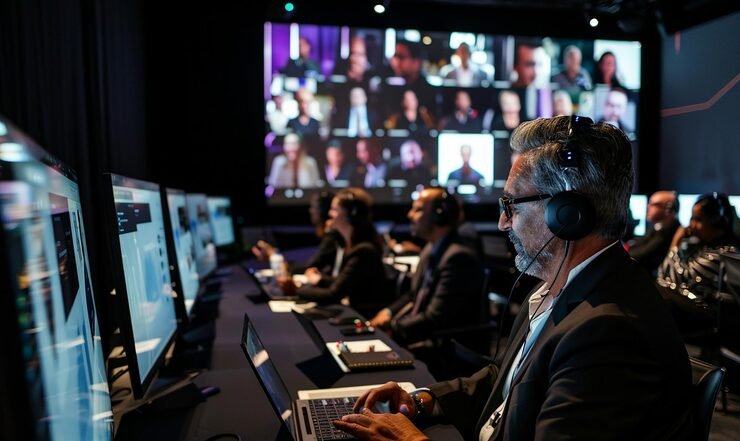
Multi-Camera Live Broadcasting Services for Large-Scale Events
Multi-Camera Live Broadcasting Services, Large-scale events, whether a corporate conference, a concert, or a major product launch, often reach audiences far beyond the people sitting in the room. Live broadcasting has become one of the most effective ways to extend an event’s reach, allowing viewers anywhere in the world to watch key moments as they happen.
A single camera can only show one angle at a time, which limits how engaging a broadcast feels. This is where multi-camera live broadcasting comes in. By using several cameras at once, event organizers can deliver a dynamic, professional viewing experience that keeps remote audiences fully engaged from start to finish.
What Is Multi-Camera Live Broadcasting
Multi-camera live broadcasting is the process of capturing an event using two or more cameras at the same time, then switching between these camera feeds during the live stream. Each camera can focus on a different angle, such as a wide shot of the stage, a close up of a speaker, or a view of the audience reaction.
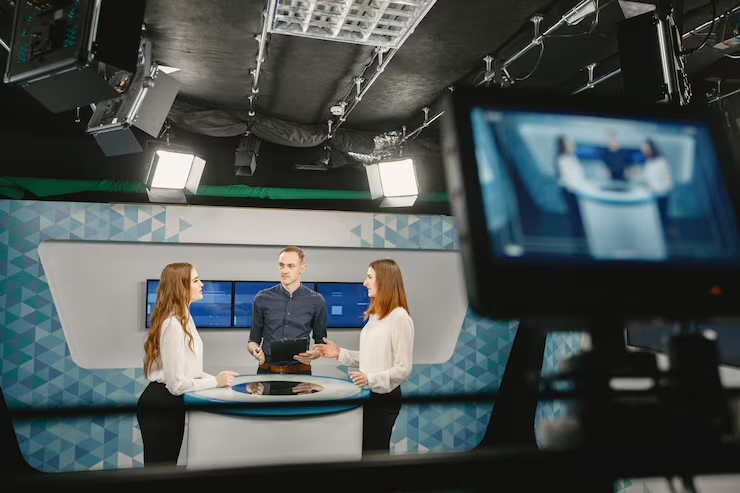
A production team uses a video switcher to move smoothly between these angles in real time, creating a polished broadcast that feels similar to watching a television show rather than a single static video feed.
Why Large-Scale Events Need Multi-Camera Coverage
Large events often have multiple points of interest happening at once. A conference might have a speaker on stage, a presentation screen, and audience interaction all worth capturing. A single camera simply cannot cover all of this effectively.
Multi-camera coverage keeps the viewer engaged by constantly offering fresh perspectives. This is especially important for corporate events, where maintaining audience attention through a livestream directly affects how much information viewers retain. According to Forbes, events with strong production value tend to leave a stronger impression on both in person and remote audiences, which highlights why quality broadcasting matters as much as the event itself.
How Multi-Camera Live Broadcasting Works

A professional multi-camera setup generally follows these steps.
1. Camera placement Cameras are positioned at different points around the venue to capture wide shots, medium shots, and close ups.
2. Signal transmission Each camera sends its video feed, usually through HDMI or SDI cables, to a central video switcher.
3. Live switching A production operator watches all camera feeds at once and switches between them at the right moments, following the flow of the event.
4. Audio mixing Microphones from the stage, podium, or audience are balanced through an audio mixer to keep sound levels clear and consistent.
5. Encoding and streaming The final mixed feed is sent through an encoder, which prepares the video for streaming platforms such as YouTube, Facebook, or a private company channel.
6. Monitoring Throughout the broadcast, the team monitors stream quality, connection stability, and audience engagement to catch and fix issues quickly.
Key Benefits of Multi-Camera Live Streaming
More engaging viewer experience Switching between angles keeps the broadcast visually interesting, rather than showing one static frame for the entire event.
Better storytelling Wide shots establish the setting, medium shots capture interactions, and close ups highlight emotion, together creating a more complete picture of the event.
Wider audience reach Viewers who cannot attend in person can still experience the event clearly, which is especially valuable for corporate events, product launches, and large weddings.
Stronger brand impression A polished, professional broadcast reflects positively on the brand or organization hosting the event, much like the visual quality of a television production.
Backup and redundancy If one camera has a technical issue, the production team can switch to another feed without interrupting the broadcast.
Equipment Used in Professional Multi-Camera Broadcasts
A typical multi-camera broadcast setup includes:
- Multiple professional cameras positioned at different angles
- A video switcher to control transitions between feeds
- An audio mixer for clear, balanced sound
- A streaming encoder to prepare the feed for online platforms
- Stable internet connectivity to avoid dropped streams
- Backup power and equipment in case of technical failure
Professional teams, such as Hamza’s Production broadcasting and live streaming services, bring this equipment along with trained operators who understand how to manage a live event without disruptions.
Types of Events That Use Multi-Camera Broadcasting
Multi-camera live broadcasting is used across many types of large-scale events, including:
- Corporate conferences and seminars
- Product launches and brand activations
- Weddings with remote family members
- Concerts and live performances
- Award ceremonies and galas
- Panel discussions and press conferences
Each event type benefits differently. A wedding broadcast focuses on emotional close ups and key moments, while a corporate conference broadcast focuses more on clear presentation visuals and speaker coverage. Businesses hosting a launch event often pair broadcasting with full event management services to keep planning and production under one coordinated team.
Common Challenges in Multi-Camera Live Broadcasting
Technical complexity Managing multiple cameras, cables, and audio sources requires skilled operators who understand how to keep everything synchronized.
Internet reliability A stable, high speed connection is essential, since a dropped stream can disrupt the viewing experience for remote audiences.
Venue limitations Some venues have limited space or power access, which requires careful planning of camera placement and equipment setup in advance.
Timing and coordination Switching between camera angles at the right moment takes practice and clear communication between the event team and the production crew.
Working with an experienced broadcasting team helps avoid these issues, since professionals plan for potential problems well before the event begins.
How to Plan a Multi-Camera Broadcast for Your Event
1. Define your goals Decide what you want the broadcast to achieve, whether it is wider reach, better documentation, or audience engagement.
2. Choose the right platform Select where the stream will be shown, such as YouTube, Facebook, or a private company website.
3. Scout the venue Identify the best camera positions, power access points, and internet connectivity options ahead of time.
4. Coordinate with the event schedule Share the full event run of show with the broadcasting team so camera switches align with key moments like speeches or product reveals.
5. Test before going live A full technical run through before the event helps catch any equipment or connectivity issues early.
Choosing the Right Live Broadcasting Team
Check their experience with large-scale events. A team experienced in corporate conferences or big weddings will understand the pacing and coordination needed for smooth broadcasts.
Review their past broadcasts. Ask to see samples of previous live streams to judge video quality, audio clarity, and overall production value.
Confirm their equipment and backup plans. A reliable team should have backup cameras, power, and internet options in case of technical issues.
Ask about coordination with event planning. Teams that also offer corporate event coverage or full event management can align broadcasting with the overall event timeline more easily.
Full service providers like Hamza’s Production combine event management, photography, and multi-camera broadcasting under one team, which reduces coordination issues on the event day.
Tips for a Smooth Live Broadcast
- Always run a full equipment test at least a day before the event.
- Keep a backup internet connection ready in case the primary connection fails.
- Brief speakers and hosts on where cameras are positioned so they naturally face the right angles.
- Assign one team member to monitor stream quality throughout the event.
- Record the full broadcast locally as a backup, even while streaming live.
Conclusion
Multi-camera live broadcasting has become an essential part of large-scale event production, allowing organizers to reach wider audiences with a professional, engaging viewing experience. From corporate conferences to major celebrations, a well planned broadcast adds real value beyond the event itself.
Working with an experienced production team ensures the technical side runs smoothly, so the focus can stay on delivering a great event. Businesses and event planners can explore full broadcasting and production solutions through Hamza’s Production or get started by visiting the booking page to discuss their event needs.
Frequently Asked Questions
How many cameras are needed for a multi-camera live broadcast?
Most professional setups use at least two to four cameras, though larger events may use more depending on the venue size and number of key moments to capture.
Is multi-camera broadcasting only for large events?
While it offers the most benefit for large-scale events, smaller gatherings can also use multi-camera setups to create a more engaging viewing experience for remote guests.
What internet speed is needed for a stable live broadcast?
A stable, high speed connection with strong upload bandwidth is recommended, and many professional teams also bring backup connections to avoid interruptions.
Can a multi-camera broadcast be combined with event photography?
Yes. Many event teams offer both services together, allowing photography and live broadcasting to run smoothly side by side without conflicting equipment or schedules.




Leave a Reply